Get Started with ROS MBot
Last Updated: Jan 16, 2026
Hardware
First, please follow the hardware setup guide. You can skip the “Extra Wiring Step: LiDAR Power Update” part if you don’t have the LiDAR power cable.
- If you do the “Extra Wiring Step: LiDAR Power Update” part, LiDAR pub rate is default to 10 HZ.
- If you skip the “Extra Wiring Step: LiDAR Power Update” part, LiDAR pub rate is default to 7 HZ.
Software
Note for ROS2 MBot Classic non-UM users and UM instructors outside ROB 550:
- All Botlab documentation is compatible only with ROS2 MBot Classic systems running at least the following versions:
| Repository | Version | Visibility | Note |
|---|---|---|---|
| mbot_firmware_ros | v1.1.5 | Public | Firmware code |
| mbot_ros2_ws | v1.0.3 | Public | ROS ecosystem |
| mbot_ros_labs | W26 | Private | Lab Assignments |
How to check your version:
- Check the file VERSION in the repository root.
- If it is missing, your copy is outdated, pull the latest release.
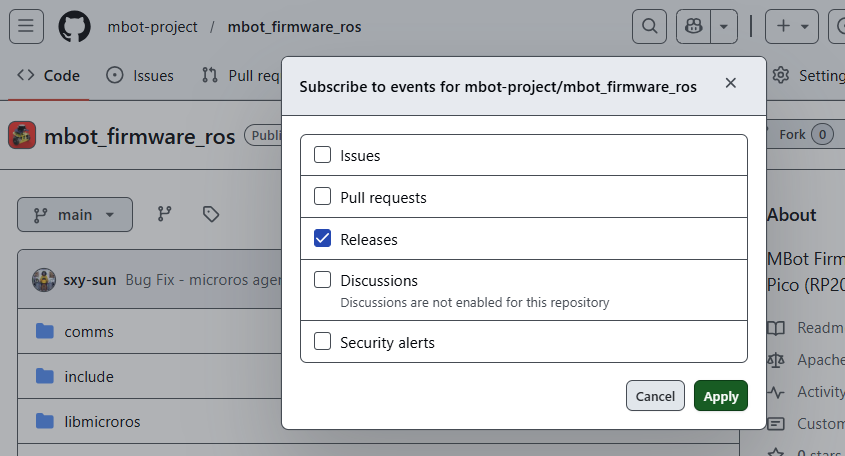
To follow MBot software updates, go to the repository and select Watch → Custom → Releases on GitHub. You will receive an email whenever a new release is published. We recommend that instructors follow the repositories, as new releases may be published during the semester.